
How IPTV for Beginners Works – NetGo TV / CatchOn TV
IPTV for Beginners can feel confusing at first—especially if you’re used to traditional cable or satellite TV, but the truth is that IPTV is designed to make watching TV more flexible and convenient. This guide is created specifically for first-time users who want a clear, easy-to-understand explanation without complicated jargon.
We’ll walk through the basics step by step, and help you understand whether IPTV is a good fit for your viewing habits. If you’ve ever thought about switching to internet-based TV but didn’t know where to begin, you’re in the right place.
IPTV for Beginners and What it Stands For?
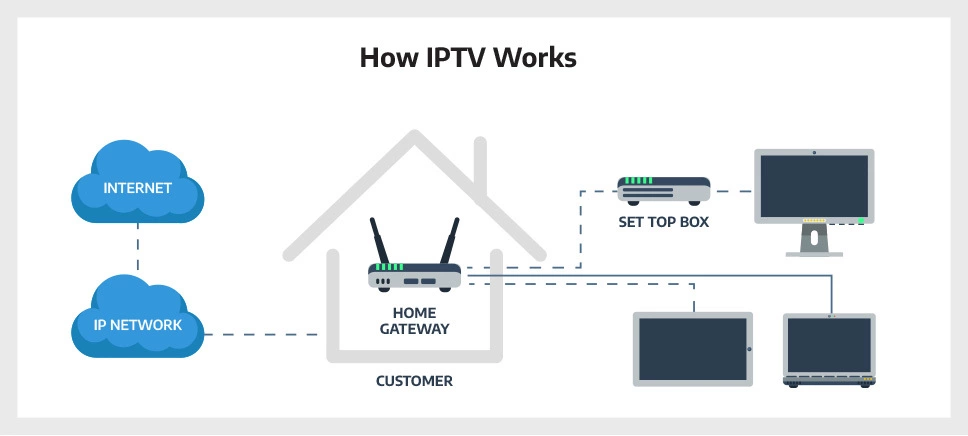
IPTV stands for Internet Protocol Television. Rather than receiving channels through a physical cable line or a satellite dish, IPTV streams TV content directly to your device through an internet connection.
If you’ve ever watched a movie on Netflix or a video on YouTube, you’ve already experienced something very similar. The difference is that IPTV focuses on delivering live TV channels, on-demand movies, and TV shows all in one place. Once you open an IPTV app and select a channel or program, the content starts playing almost instantly, as long as your internet connection is stable.
How IPTV Actually Works
- IPTV delivers TV channels, movies, and shows through the internet instead of cable or satellite signals. The content is stored or streamed from online servers and sent directly to your device when you choose what to watch.
- When you open an IPTV app on your TV, phone, or streaming device, the app connects to an IPTV service that provides access to its available channels and on-demand content.
- Unlike traditional TV, IPTV does not broadcast all channels at the same time. It only streams the channel or program you select, which helps reduce unnecessary data use and allows for quicker channel switching.
- Your device receives the stream, decodes the video, and displays it on your screen in real time, as long as your internet connection is stable.
- For beginners, the most important thing to remember is that IPTV works on demand—you choose what to watch, and the content plays instantly using your internet connection.
What You Need to Start Using IPTV
- A stable internet connection
IPTV relies on the internet to stream content, so a reliable and reasonably fast connection is essential for smooth viewing. - A compatible device
You can use IPTV on Smart TVs, Android TV or Fire Stick devices, smartphones, tablets, or computers. - An IPTV player app
This is the app that allows you to load and watch IPTV channels. The app acts as the player where all content appears. - An IPTV subscription or playlist
To access channels and on-demand content, you’ll need a service or playlist provided by an IPTV provider.
What You Can Watch With IPTV
IPTV offers live TV channels, including news, entertainment, sports, and international programming, allowing viewers to watch real-time. This means you can watch movies and TV shows whenever you want.
Some services also organize content into categories such as kids’ shows, lifestyle channels, or music, making it easier to find what you’re looking for.
Watch the full YouTube video and don’t forget to Like and Subscribe!
Get NetGo TV today and Visit the Pricing page, or click on the any of Get Started button found on the home page. Feel free to contact us if you have any questions.
Download CatchON TV / NetGo TV apps:
